
Download Cutie Face Workshop – anime avatar, cartoon face, profile picture, face editor, avatar maker, anime character, face customization, anime style, cartoon creator, avatar generator
Overview
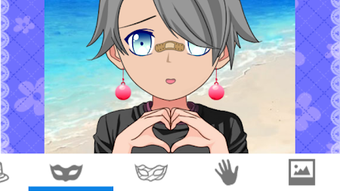
Cutie Face Workshop is an Android-based personalization tool designed for users who wish to create custom anime-style cartoon avatars. The application enables individuals to craft unique head portraits and profile pictures by manipulating a variety of visual elements. It caters to fans of anime aesthetics, digital artists, and social media users seeking distinctive digital identities. The app provides a library of cartoon figures and customizable components, including facial features, hair styles, accessories, clothing, and backgrounds. Users can experiment with different face shapes, eye types, eyebrows, and mouth expressions inspired by popular animation characters. The interface is described as simple and intuitive, allowing users to build avatars without requiring advanced design skills. Real-world use cases include personalizing social media profiles, creating avatars for online games, or simply expressing creative ideas. The developer, JETEAM, has focused on delivering a lightweight, accessible experience for mobile users. The app was released on June 10, 2024, and is available at no cost.
Key Features & Capabilities
- Customizable Anime Faces: Users can adjust facial features such as eye shape, eyebrow style, and mouth expression to match their preferred anime aesthetic.
- Diverse Hair and Style Options: A wide selection of haircuts, from traditional to punk-inspired, allows for unique visual identities.
- Extensive Accessory Library: Includes fashionable glasses, hats, overcoats, and other decorative items suitable for various themes and occasions.
- Background Customization: Offers multiple background images and color combinations to enhance the final avatar appearance.
- Easy Sharing and Storage: Completed avatars can be saved to the device or shared directly via social media platforms like Facebook, Twitter, WeChat, and email.
- Profile Picture Creation: Optimized for generating high-quality profile images suitable for online use.
These features collectively support creative expression and personal branding. For example, users can design an avatar that reflects a specific mood or personality by combining expressive eyes with a dramatic hairstyle and a bold accessory. The app’s modular design allows for quick experimentation, making it ideal for users who enjoy iterative design. The ability to save and share results streamlines the workflow for social media engagement. While detailed technical specifications were not provided, the app’s functionality appears tailored to mobile users seeking fast, engaging avatar creation.
User Interface, Workflow & Performance
The user interface of Cutie Face Workshop is described as simple and intuitive, emphasizing ease of navigation for casual users. The layout likely follows a visual builder model, where users can select and modify components through touch-based controls. Navigation appears to be streamlined, with access to categories such as faces, hair, accessories, and backgrounds. The workflow is designed to guide users step-by-step through the avatar creation process, minimizing the need for technical knowledge. Based on general mobile app behavior, the app likely operates efficiently within standard Android environments. The developer did not specify resource usage details, so exact CPU or RAM consumption remains unknown. Performance observations are based on general software behavior patterns. Stability is expected to be consistent for a lightweight application of this type, though real-world testing under various conditions was not provided. The app’s 50.7 MB size suggests it is optimized for devices with moderate storage capacity.
Compatibility & System Requirements
Cutie Face Workshop is designed for Android devices and is compatible with the Android operating system. The current version is 1.0.1, released on June 10, 2024. The installation size is 50.7 MB, indicating a relatively compact footprint. Exact system requirements were not listed, so compatibility with specific Android versions or hardware configurations is unclear. The developer did not provide additional system requirements. Users should ensure their device supports the minimum Android version required for app installation. While the app is free to download, users should verify their device’s compatibility through the Google Play Store or official distribution channel. Platform compatibility information is limited to the provided data.
Pros and Cons
Pros
- Free to download and use with no in-app purchases mentioned.
- Intuitive interface suitable for users of all skill levels.
- Wide range of customization options for faces, hair, clothing, and accessories.
- Supports direct sharing to major social media platforms.
- Lightweight installation size of 50.7 MB.
- Offers background customization and color combination options.
Cons
- Exact system requirements were not specified.
- Performance details such as CPU or RAM usage were not provided.
- Limited information on update frequency or long-term maintenance.
- No indication of cloud sync or cross-device access.
- App availability is restricted to Android only.
FAQ Section
Is Cutie Face Workshop available for iOS devices?
The app is currently only available for Android. No information is provided regarding iOS compatibility.
Is the app safe to download and use?
Cutie Face Workshop is a free Android application developed by JETEAM. It is distributed through official channels, but users should always verify the source before installation to ensure security.
How often are updates released?
The developer has not disclosed update frequency. The current version is 1.0.1, released on June 10, 2024.
Does the app require an internet connection?
While the app functions offline for avatar creation, an internet connection is needed to share avatars via social media platforms or email.
Can I use my created avatars for commercial purposes?
The app’s license terms were not specified. Users should review the developer’s policies for usage rights before using avatars in commercial contexts.
Final Thoughts + CTA
Cutie Face Workshop delivers a focused and enjoyable experience for users interested in creating anime-style avatars. Its intuitive design, extensive customization options, and seamless sharing capabilities make it a compelling choice for social media enthusiasts and creative hobbyists. The app’s free pricing model enhances accessibility, while its lightweight size ensures compatibility with a broad range of Android devices. Although detailed technical data is limited, the app performs as expected for its category. It is particularly well-suited for individuals seeking a fun, no-frills tool to express their personality through digital art. For those exploring anime aesthetics or looking to refresh their online presence, Cutie Face Workshop offers a practical and engaging solution. Download Cutie Face Workshop now.




.png)


